

Encrypting Data Before Uploading to the Cloud
Cloud storage is a lifesaver for backups; it’s easy, accessible, and protects your data from local disasters like hardware failures or theft. But here’s the catch: when you upload your files to the cloud, they’re no longer fully under your control. They’re stored on servers owned by companies like Google Drive , Dropbox , Telegram , or OneDrive . And let’s be honest those servers are just someone else’s computers.
You don’t know where your data physically is. It could be in a massive data center or even on a random server in someone’s basement. Even with big providers, you’re trusting them to handle your files securely.
Yes, they can. Even if they claim to encrypt your data, they might still hold the encryption keys. That means they (or their employees) could technically peek at your files whenever they want.
If your data isn’t encrypted properly (or at all), hackers could break in and steal your files. Imagine your private photos, sensitive documents, or financial info being leaked or posted online.
To keep your data truly private, encrypt it yourself before uploading it to the cloud . Here’s how:
Encrypting Files with GPG
Use GPG (GNU Privacy Guard) to encrypt your files with AES-256 , a strong and widely trusted encryption algorithm. I’ll show you how to encrypt your data on different operating systems such as Android, Windows, and Linux.
Encrypting Data On Windows
For using GPG on Windows, we use GPG4win .
Download it here:
1.
Open the folder containing your files, right-click, and open the Command Prompt in that folder:

You can open your CMD then type your folder address:

Encrypt your files using this command:
gpg -c --no-symkey-cache --cipher-algo AES256 secret.txt
What Does This Command Do?
1.
2.
3.
4.
5.
What Happens When You Run This Command?
1.
You’ll be prompted to create a passphrase (e.g., 1win@one$chess.game&I.was.so-happy ).
2.
GPG creates an encrypted file named secret.txt.gpg
3.
The original file remains unchanged. Securely delete it with a tool like shred if needed.
Enter your passphrase and click OK .

Decrypting the File
To decrypt, use:
gpg --decrypt secret.txt.gpg
GPG will prompt you for the passphrase.

Encrypting Data On Linux
We follow same step step on Linux too .
Open console on your folder your files on there and run same commands .
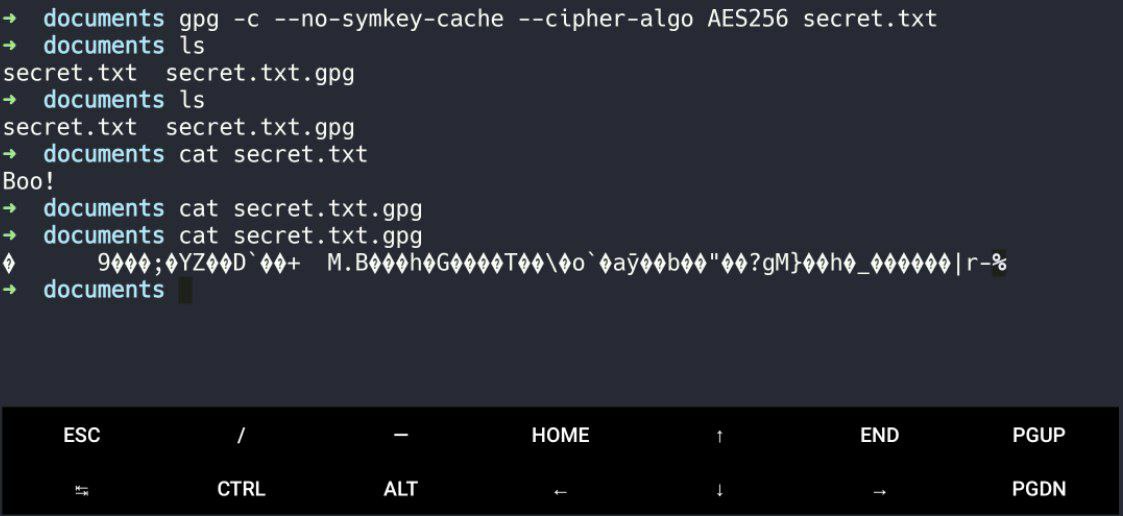
⟩ gpg -c --no-symkey-cache --cipher-algo AES256 secret.txt
⟩ ls
secret.txt secret.txt.gpg
⟩ shred -vzuxf -n 4 secret.txt
shred: secret.txt: pass 1/5 (random)...
shred: secret.txt: pass 2/5 (ffffff)...
shred: secret.txt: pass 3/5 (000000)...
shred: secret.txt: pass 4/5 (random)...
shred: secret.txt: pass 5/5 (000000)...
shred: secret.txt: removing
shred: secret.txt: renamed to 0000000000
shred: 0000000000: renamed to 000000000
shred: 000000000: renamed to 00000000
shred: 00000000: renamed to 0000000
shred: 0000000: renamed to 000000
shred: 000000: renamed to 00000
shred: 00000: renamed to 0000
shred: 0000: renamed to 000
shred: 000: renamed to 00
shred: 00: renamed to 0
shred: secret.txt: removed
⟩ gpg --decrypt secret.txt.gpg
Encrypting Data On Android
For Android we need a software call Termux you can download it from here :
When you first install Termux it's need some command for config and update it i put them blow :
⟩ pkg update -y && pkg upgrade -y
⟩ pkg install gnupg -y
⟩ termux-setup-storage
⟩ gpg -c --no-symkey-cache --cipher-algo AES256 secret.txt
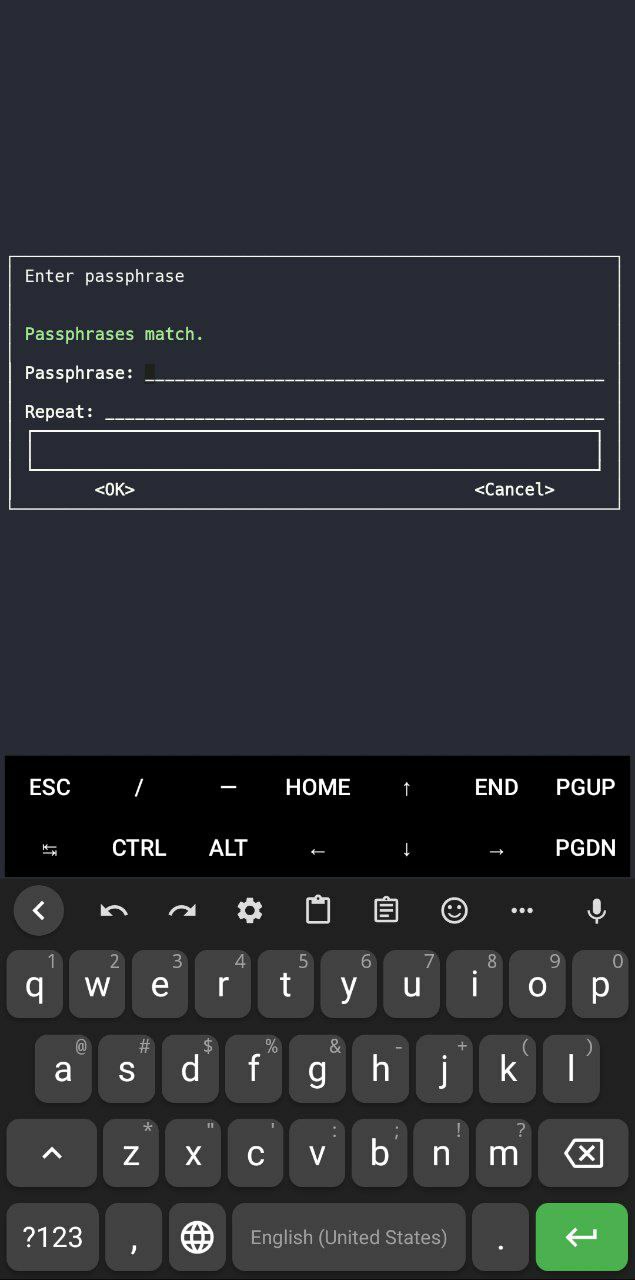
Then in this page enter your Passphrase ( more 8 character ) you can't use touchscreen with tap we move to next place (Passphrase —tab→ Repeat —tab→ <OK> —tab→ <Cancel>)
Passphrase vs. Password
Some security experts suggest including emojis for added complexity:
Shred
Why Use These Options?
Is AES-256 Really Unbreakable?
Technically, AES-256 isn’t mathematically unbreakable, but:
The key space is enormous (2^256 possible keys), making brute-force attacks impractical.
Quantum computers could reduce its effectiveness, but it’s still highly secure.
Zero-Trust Cloud: A Better Approach For Cloud Storage
The zero-trust cloud model takes security a step further. Instead of trusting the cloud provider to encrypt your data, you encrypt it on your own device before uploading it. This way:
Your data is encrypted before it ever reaches the cloud.
Even if someone gains physical access to the cloud servers (e.g., by pulling out hard drives), they’ll only see encrypted gibberish.
You don’t have to rely on the cloud provider’s encryption practices or trust them with your keys.
By combining zero-trust principles with client-side encryption (like GPG), you ensure that your data remains private and secure, no matter where it’s stored.
Symmetric vs. Asymmetric Encryption
Final Thoughts
Encrypting files before uploading ensures only you can access your data. Even if stolen, files remain gibberish without your passphrase. Use GPG and AES-256 to take control of your privacy and adopt a zero-trust approach for ironclad security!
Todo
Hijacking sessions
log out loging log in some time
Are closing forward and timer pics really effective?
Leaked databases
Some time you close all hols you encrypt your data you don't share things maybe put you in danger only because you think the program you use is 100% secure i mean the self-destructive but what about leak data bases ? what we gonna do about them so the only way is delete account and i explane way it's the only way and how your data can be leak.
If you never use a threth party Telegram you probly safe .
Airdrops links and IDs in link
Anonymous bots
Custom stickers